Radarr, Sonarr, and Seerr Options
Control media additions, requests, and tag updates for an individual collection or playlist definition. Put these options beside a builder, rather than inside its dictionary. For source selection, see the Radarr and Sonarr builders.
Configure the service first
Configure Radarr, Sonarr, or Seerr globally or for the library before using its definition options. Radarr/Sonarr values inherit their global/library configuration unless overridden here.
Adding to arr
| Option | Selects for addition |
|---|---|
radarr_add_missing, sonarr_add_missing |
Builder results missing from Plex |
radarr_add_existing, sonarr_add_existing |
Builder results already in Plex but not in Radarr/Sonarr |
Missing additions help acquire unavailable media. Existing additions register
media you already have. When Plex and Radarr/Sonarr see different filesystem
paths, set plex_path with radarr_path or sonarr_path in the corresponding
service configuration; those mappings are not definition-level options here.
Shared Radarr/Sonarr overrides
All options in this table are booleans. Use unquoted true or false to override
the corresponding service setting for this definition.
| Radarr option | Sonarr option | Purpose |
|---|---|---|
radarr_add_missing |
sonarr_add_missing |
Add missing builder results |
radarr_add_existing |
sonarr_add_existing |
Add existing Plex media to the service |
radarr_upgrade_existing |
sonarr_upgrade_existing |
Apply the definition's quality profile to existing records |
radarr_monitor_existing |
sonarr_monitor_existing |
Apply monitoring settings to existing records |
radarr_ignore_cache |
sonarr_ignore_cache |
Ignore Kometa's cache when adding items |
radarr_search |
sonarr_search |
Search when adding media |
Missing movies
Selects the top 20 popular TMDb movies and enables missing-movie additions to
Radarr. true is a boolean, while 20 is the builder's integer result count.
The root folder and profile strings must match your Radarr configuration.
collections:
  Popular Movies to Add:
    tmdb_popular: 20
    radarr_add_missing: true
    radarr_root_folder_path: /movies
    radarr_quality_profile: HD-1080p
    radarr_search: true
Radarr options
| Attribute | Value | Purpose |
|---|---|---|
radarr_root_folder_path |
Folder path string | Root folder for additions |
radarr_monitor |
Boolean | Monitor newly added movies |
radarr_minimum_availability |
announced, cinemas, released, db |
Override the service's availability setting |
radarr_quality_profile |
Radarr quality profile | Override quality_profile |
radarr_tags |
YAML list or comma-separated tag string | Override the service's tag setting |
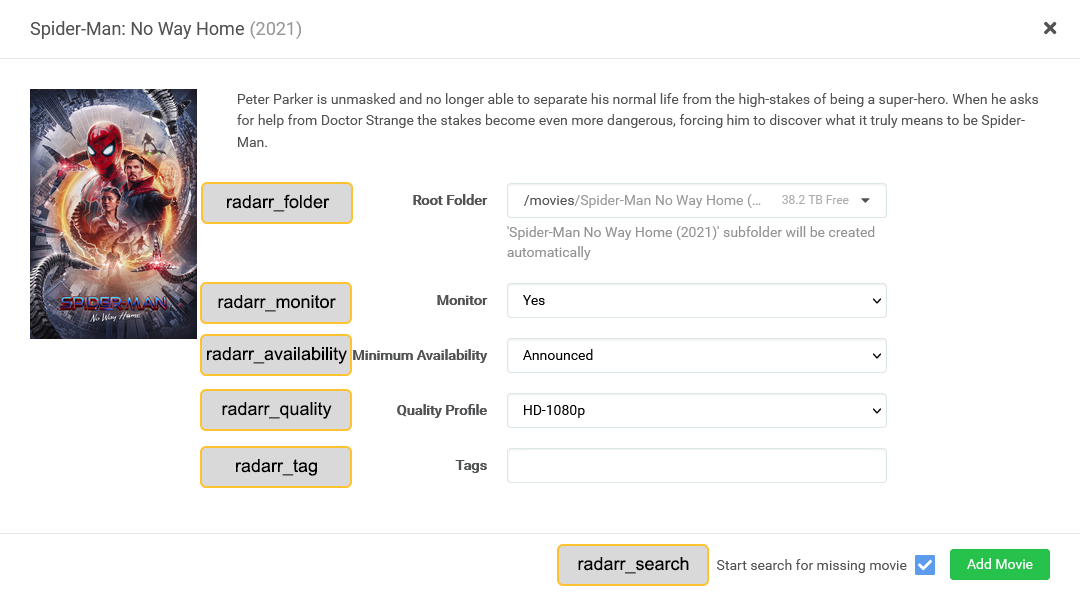
Radarr add settings
These correspond to the options available when adding a movie in Radarr.
Radarr add screen
Sonarr options
| Attribute | Value | Purpose |
|---|---|---|
sonarr_root_folder_path |
Folder path string | Root folder for additions |
sonarr_monitor |
all, future, missing, existing, pilot, first, latest, none |
Episode monitoring policy |
sonarr_quality_profile |
Sonarr quality profile | Override quality_profile |
sonarr_language_profile |
Sonarr language profile | Override language_profile |
sonarr_series_type |
standard, daily, anime |
Series type for additions |
sonarr_season_folder |
Boolean | Use season folders |
sonarr_tags |
YAML list or comma-separated tag string | Override the service's tag setting |
sonarr_cutoff_search |
Boolean | Search for episodes with an unmet quality cutoff |
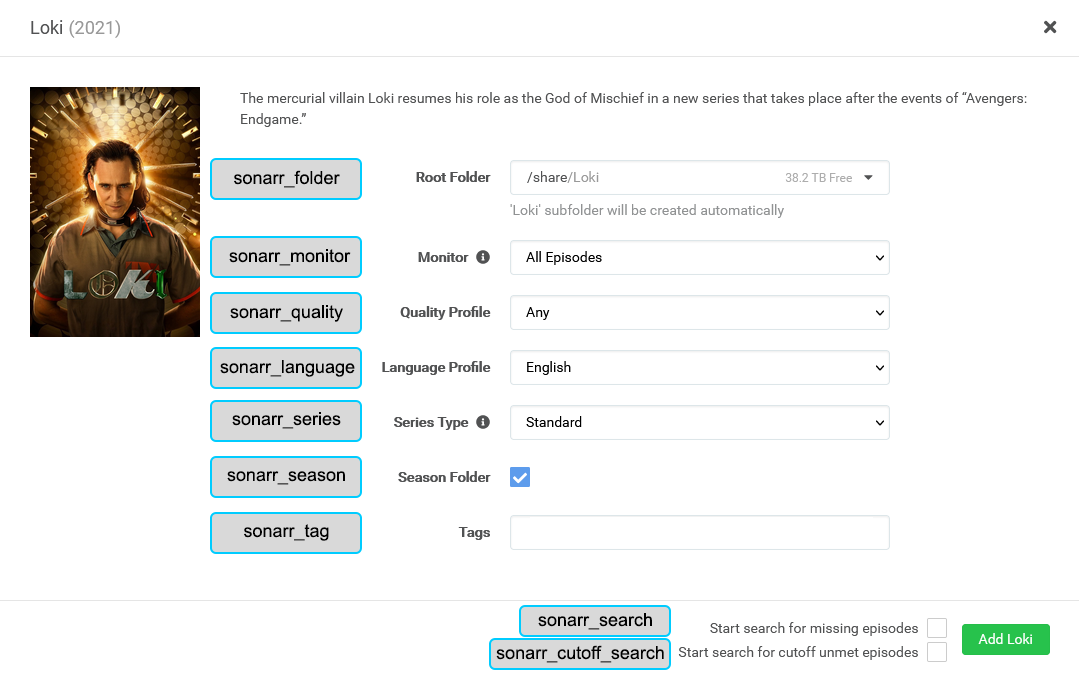
Use the exact profile names, including spaces and capitalization, from your service configuration.
Sonarr add settings
Selects 10 popular shows, enables missing-show additions, monitors future episodes,
and uses season folders. future is a monitoring string, not a boolean. Tags are
strings in a YAML list; replace paths and profiles with your own values.
collections:
  Popular Shows to Add:
    tmdb_popular: 10
    sonarr_add_missing: true
    sonarr_root_folder_path: /tv
    sonarr_quality_profile: HD-1080p
    sonarr_monitor: future
    sonarr_series_type: standard
    sonarr_season_folder: true
    sonarr_tags:
      - kometa
      - popular
Sonarr add screen
Arr edit settings
These options affect items found by the builders that already have a record in
Radarr/Sonarr. They differ from radarr_tags / sonarr_tags, which override the
service's addition settings. Values accept a YAML list or comma-separated string.
| Radarr option | Sonarr option | Effect |
|---|---|---|
item_radarr_tag |
item_sonarr_tag |
Append the supplied tags |
item_radarr_tag.remove |
item_sonarr_tag.remove |
Remove the supplied tags |
item_radarr_tag.sync |
item_sonarr_tag.sync |
Replace the existing tag set with the supplied tags |
Finds library movies tracked by Radarr and appends the kometa and
reviewed tags to their Radarr records, retaining other existing tags.
Removes old-tag from Sonarr records for the selected series. It does not
remove the series or its other tags.
Seerr options
Seerr routes movie/show requests through its configured Radarr and Sonarr servers. Its request options are independent of direct Radarr/Sonarr additions: enabling both routes also sends additions directly to those services.
| Attribute | Value | Purpose / default |
|---|---|---|
seerr_add_missing |
Boolean | Request media missing from Plex |
seerr_add_existing |
Boolean | Request media already in Plex, such as a 4K version |
seerr_instance |
standard, 4k, both |
Request tier; default standard |
seerr_overrides |
Dictionary with standard and/or 4k |
Per-tier server, profile, and root-folder overrides |
Each override tier can contain server_id, quality_profile (ID or name), and
root_folder. Unset values use Seerr's defaults for that tier; configure regular
and 4K servers in Seerr. both makes separate tier requests, so one tier's failure
or duplicate does not prevent the other from being attempted. Shows request all
seasons. See Seerr configuration for connection settings.
Requests missing popular movies in both standard and 4K tiers. The integer
20 limits the source builder; true enables requests and both is a tier string.
Requests a 4K version of movies already in Plex. The nested dictionary overrides only the 4K tier. Replace server ID, quality profile ID, and root folder with values from your Seerr setup.